
Kraft Paper Greeting Cards
$145.00Total for quantity 50 · before tax and shipping
- Kraft greeting cards are printed on high-quality kraft cardstock that’s 100% recyclable. Printing on kraft paper can make even the most generic greeting card look unique.
Choose Size
Description
Envelope
Below are the envelope sizes for each of our standard greeting card sizes. Please note that any custom size greeting cards will not be a perfect fit with our standard envelopes. These envelopes will not be printed (white only). For printed envelopes, please order here.


18PT Kraft Board
Kraft paper texture is coarse and uncoated. This brown kraft stock is both recycled and recyclable, making kraft paper greeting cards an environmentally friendly purchase.

Kraft Paper Printing
Despite the roughness of the stock, printing on kraft paper still produces good coverage. We recommend using dark colors so that it creates a strong contrast on the kraft greeting card. White ink printing on kraft paper is coming soon.

Unique Kraft Greeting Cards
You’ll notice the unique pattern of pulp of custom printed kraft paper. This makes kraft paper greeting cards a hit among hip independent shops and cafes that love the rustic, natural feel.
Additional information
| Weight | 0.08 lbs |
|---|---|
| Dimensions | 10 × 40 × 40 in |
Download Setup Guide
Step 1:
Ensure the file matches the product’s required dimensions. Ensure that the artwork
is created in CMYK 300 dpi with 1/16 inch bleeds on all sides.
Step 2:
Make sure that all images are embedded, and that all the text is outlined.
Step 3:
Export all files into PDF format with bleeds.
How to set up multi-page files properly
Vertical
Horizontal
File Orientation Guide
How to set up proper orientation for your files
File Orientation refers to the orientation of the artwork files submitted. Ensure that they are submitted to back up properly to produce the intended result.
Folded Artworks (Greeting Cards, Folded Business Cards, etc.)
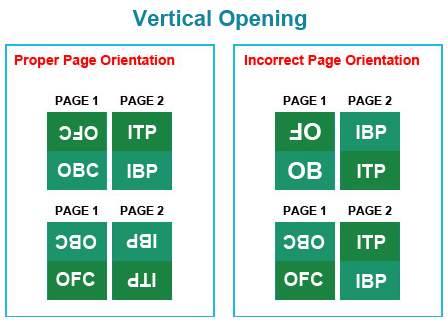
LEGEND: OFC – Outside Front Cover; OBC – Outside back cover; ITP – Inside Top Panel IBP – Inside Bottom Panel (a.k.a Inside Cover)

LEGEND: OFC – Outside Front Cover; OBC – Outside back cover; ILP – Inside Left Panel (a.k.a Inside Front Cover); IRP – Inside Right Panel (a.k.a Inside Back Cover)
How To Set Up Your Files
General File Preparation Guidelines
- Download our guides to ensure a more optimal print result.
- Be sure to DELETE any hidden layers that are not intended to print (ie: setup guide layers or other hidden artwork layers) to ensure no risk of them appearing on the final print.
- Each job (including multiple paged projects) must be submitted as a single PDF file. Ensure that all pages are the same size.
- Files must be submitted with proper orientation to ensure proper backup.
- It is best to try to avoid using borders in your design. If a border is too close to the trim, the trim may be slightly off-center.
- File must consist of 1/8″ bleed and all important art and text must be within the safety margin.
- Ensure that your PDF is high res and that all images are CMYK at 300 DPI.
- Black type should have the following values: C0, M0, Y0, K100.
- Embed or outline all fonts.
- For best colour results, supply a CMYK only files.